
Alongside the rapid growth of Linux gaming and content creation, there is one critically important area that receives far too little attention, even though it forms the backbone of the modern multimedia experience. That area is the audio system.
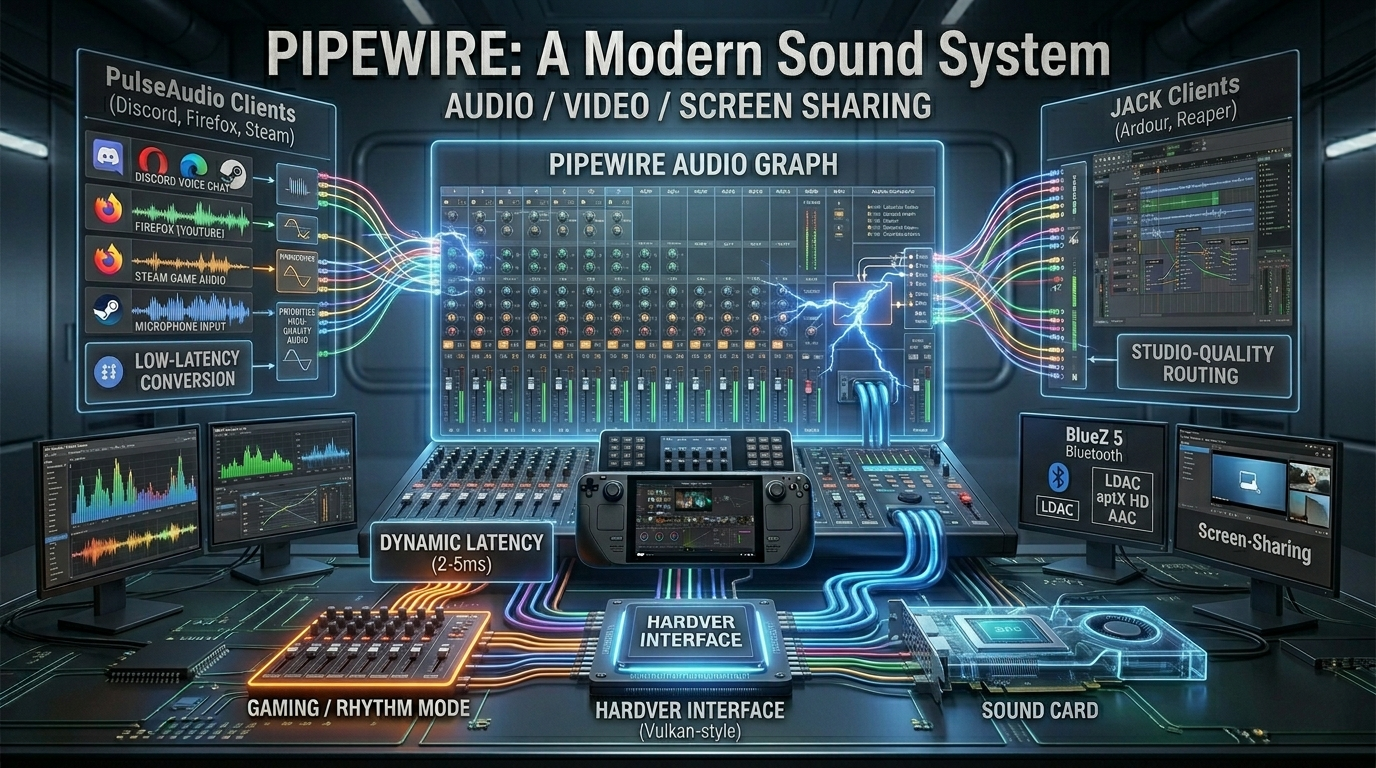
For years, audio management on Linux was synonymous with frustration: the bare-bones ALSA, the crash-prone PulseAudio, and the professional yet endlessly complicated JACK created such a chaotic system that even connecting a Bluetooth headset or starting a Discord stream required serious command-line magic.
PipeWire finally put an end to this chaos, and has since become the default, unobtrusive backbone of modern Linux distributions (Debian, Fedora, Arch).
The Great Chaos: The Divide Between ALSA, PulseAudio, and JACK
To understand the genius of PipeWire, we need to see just how wide the divide was between everyday users and professionals:
- ALSA (Advanced Linux Sound Architecture): The Linux kernel’s lowest-level audio driver. It communicates directly with the hardware, is extremely fast, but by default, only a single application could use the sound card at a time. If the game was playing, the browser went silent.
- PulseAudio: PulseAudio was created to solve this problem; it is an audio server capable of software-based mixing of sounds from various sources (YouTube, games, music players). However, it operated with high latency and was notorious for its instability, as well as its poor handling of Bluetooth devices.
- JACK (Jack Audio Connection Kit): The solution for professional studios (musicians, podcast producers). It provided ultra-low latency and flexible audio routing, but was completely incompatible with PulseAudio. Once you launched your studio software (Ardour, Reaper), all other everyday applications on the machine were muted.
PipeWire: A Single Audio Server Above It All
Designed by Red Hat engineer Wim Taymans, PipeWire brings these three worlds together while eliminating all of their shortcomings. It is not just another layer, but a complete, software-based drop-in replacement for PulseAudio and JACK.
PipeWire operates on the same logic as modern graphics APIs (such as Vulkan): it maintains a single, centralized, highly flexible multimedia graph in which audio and video streams (yes, it handles webcams and screen sharing too) can be connected in any way.
Why do gamers and streamers love it?
- Dynamic Latency: If you’re just watching a YouTube video, PipeWire increases the buffer size to save power. As soon as you launch a game (or an emulator like RetroArch), the system automatically and seamlessly reduces the buffer to as low as 2–5 milliseconds, eliminating audio lag in shooters or rhythm games.
- System-level audio routing: With graphical controllers like Helvum or EasyEffects, you can visually connect audio sources using virtual cables. You can route game audio directly into OBS while filtering out your friends’ voices on Discord—all without an external mixer or physical cables.
- Flawless Bluetooth (BlueZ 5) support: PipeWire natively supports all modern, high-quality, low-latency Bluetooth codecs (LDAC, aptX HD, AAC, mSBC). Plus, it can automatically switch between high-quality music listening mode (A2DP) and microphone headset mode (HSP/HFP) without disconnecting your headphones.
Linux Audio Architecture Comparison
| Feature | Old Standard (PulseAudio + JACK) | Modern Standard (PipeWire) |
|---|---|---|
| System Latency | High in PulseAudio (~20-40ms), Low only in JACK (requires manual setup). | Dynamic & Low-latency (~2-5ms automatically applied when needed). |
| App Compatibility | Apps built for PulseAudio could not easily talk to apps built for JACK. | Unified. Seamlessly handles PulseAudio, JACK, and ALSA applications simultaneously. |
| Bluetooth Audio | Unstable connection, limited high-fidelity codec support, poor headset switching. | Flawless. Native support for LDAC, aptX, and seamless hands-free profile switching. |
| Resource Usage | Multiple sound daemons running at once, causing higher CPU overhead. | Ultra-lightweight. Single daemon architecture optimized for multi-threaded modern CPUs. |
| Video/Screen Sharing | None. Completely restricted to audio streams. | Integrated. Handles video streams, secure Wayland screen-sharing, and webcam routing. |
Useful Tools for Perfect Sound
If your distribution already uses PipeWire, you can get the most out of it with the following tools:
- EasyEffects: A brilliant graphical equalizer and effects sequencer. It can apply studio-quality noise filtering (DeepFilter/RNNoise) to your microphone at the system level, or boost your laptop’s speakers with a custom EQ profile.
- Helvum / qpwgraph: Virtual patchbeds. If you want to see exactly which virtual channel your game’s audio is routed through on your sound card, you can use these programs to graphically reroute the audio streams.
With the arrival of PipeWire, Linux has shed one of its oldest and most troublesome burdens.
The system’s audio management has not only caught up with Windows and macOS, but thanks to its professional-grade modularity, it has even surpassed them.