
One of the greatest internal debates and technological transformations in the history of Linux distributions has revolved around software installation and package management models. For decades, “dependency hell” and fragmentation across distributions were the biggest obstacles preventing developers and users from easily managing their applications across versions.
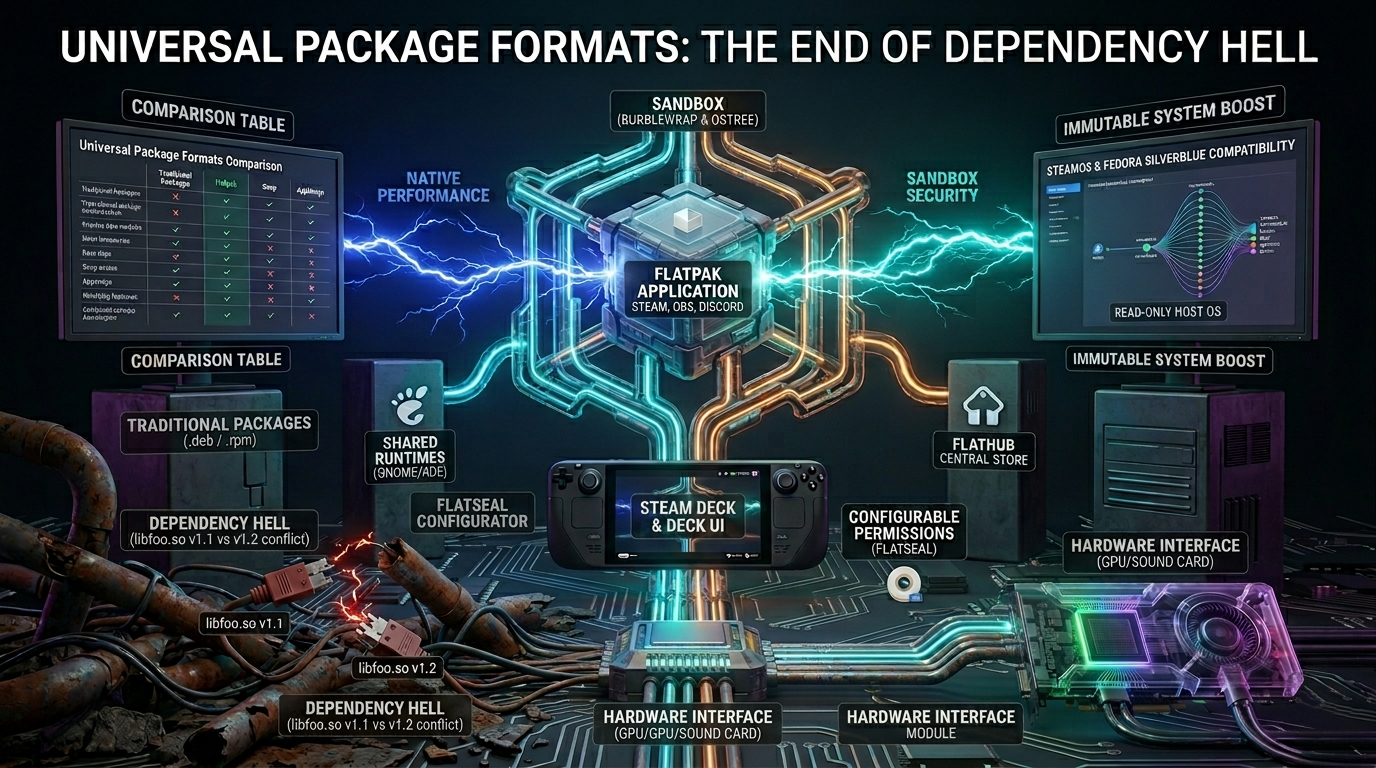
This problem was solved by universal, sandboxed package formats. Among them, Flatpak stands out, having become the backbone of modern desktop Linux and SteamOS.
1. The Limitations of Traditional Package Management
Traditional package managers (such as apt on Debian/Ubuntu or pacman on Arch Linux) install software and its dependencies (shared libraries) directly into the system directories (/usr/lib, /bin).
This model works excellently on a closed, controlled system, but it has two serious vulnerabilities:
- Dependency Hell: If application “A” requires version 1.1 of libfoo.so, but the newly installed application “B” requires version 1.2 of libfoo.so, updating the system can break application “A.”
- Fragmentation of distributions: A software developer had to build their software separately in .deb (Debian/Ubuntu) and .rpm (Fedora/RHEL) formats, or provide separate source code compilation instructions for Arch users.
Flatpak: The Universal Sandbox
Flatpak (formerly known as xdg-app) has fundamentally changed this approach. Essentially, it completely isolates applications from the host operating system and confines them to their own closed runtime environment (sandbox).
The three pillars of Flatpak:
- Runtimes: Applications do not run in a vacuum. Flatpak provides larger software packages (e.g., the GNOME or KDE platform runtimes) that multiple applications can share, so each program does not have to download the basic system files.
- Bubblewrap (Sandbox Technology): Flatpak uses the Linux kernel’s built-in namespaces, cgroups, and Seccomp filters to ensure that an application cannot access the user’s private files or hardware unless the user explicitly grants permission.
- Flathub (The Central App Store): Flathub is Flatpak’s de facto central software repository. From here, you can install Spotify, Steam, Discord, or Blender on any Linux distribution with a single click or command, whether it’s a stable Debian or a rolling-release Arch.
Universal Package Formats Comparison
| Feature | Traditional Packages (.deb / .rpm) | Flatpak (.flatpak) | Snap (.snap) | AppImage (.appimage) |
|---|---|---|---|---|
| Target Audience | System components and distribution-specific core apps. | Desktop applications (Games, Creators, Browsers). | Servers, IoT, and Ubuntu ecosystem. | Portable, single-file desktop utilities. |
| Sandboxing | None. Full access to the host system and user files. | High (via Bubblewrap). Configurable permissions per app. | High (via AppArmor). Tight Ubuntu integration. | None by default. Runs directly with user privileges. |
| Dependency Management | Shared globally. Prone to breaks during major updates. | Bundled inside sandbox / Shared via Runtimes. Zero host impact. | Bundled inside the package. Fully self-contained. | Entirely self-contained in a single executable file. |
| Startup Performance | Native. Zero overhead. | Native. No performance hit after initial launch. | Can be slow due to compressed loopback mount mechanics. | Native. Relies on mounting a virtual filesystem. |
| Central Ecosystem | Managed by individual Linux distributions. | Flathub. Decentralized architecture but unified store. | Canonical Snap Store. Centralized, closed-source backend. | None. Decentralized; downloaded directly from developers. |
Why Is This the Future? (The Age of "Immutable" Systems)
Flatpak has paved the way for the rise of so-called immutable operating systems, such as SteamOS on the Steam Deck or Fedora Silverblue.
Since the base system is write-protected, neither the user nor malicious software can physically damage the kernel. If a Flatpak application crashes or malfunctions, it won’t bring down the system, and it can be deleted along with all its configurations with a single command.
User tip for managing permissions
Since Flatpak applications are sandboxed, a newly installed video player might not recognize your external hard drive. Instead of manually configuring permissions via the command line, it’s worth installing an app called Flatseal (from FlatHub, of course). Flatseal provides a beautiful graphical interface where you can enable or disable network access, access to the audio system (PipeWire), or folder visibility on a per-app basis.