
Gemini Voice Assistant & Interactive Engine
A modern, real-time voice assistant built on Google’s latest multimodal Gemini Live API. The goal of the project is to create a seamless, human-like interaction interface in a desktop environment.
This tool makes your life easier.

Gemini Live Assistant (Linux)
Version: 1.0.0-beta
Platform: Linux (Debian 12+, Ubuntu 22.04+, Mint 21+)
Gemini Live Assistant is a modern, AI-powered assistant integrated into a desktop environment that combines the Google Gemini engine with native Linux tools. The program is not just a chatbot, but a full-fledged assistant capable of interacting with the file system, browsing the web, and managing the user’s daily tasks.
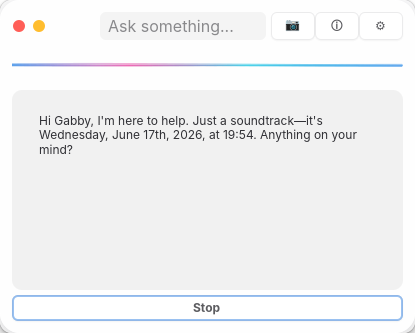


Features
- Multimodal AI Engine
- Modern, Native UI
- Integrated Web Search
- Productivity Toolkit:
- Reminder Management
- Shopping List
- Multimedia Support
- System Integration

- Environmental Awareness
- Selectable models, languages and themes

Installation and Execution
The software comes in a single standard Debian package:
sudo dpkg -i gemini-live_1.0.0_amd64.deb

sudo apt-get install -f  # To resolve GTK4 dependencies
Launch from the menu or terminal: gemini-live

Before you try out the models, you'll need a Google account and to follow a few basic steps:
- Log in to AI Studio: Get API Key
- Accepting the Privacy Policy: The first time you use the service, you must accept the Google AI Labs Privacy Policy and Terms of Service. This is a one-time step that allows AI Studio to access your projects and save your prompt history.
- Creating an API Key: In the left-hand menu, select the API Keys tab, then click the Create API Key button. Name it, assign it to a project, and copy the generated key.